Guide
Contacts on SOTI MobiControl devices
Shared Android devices need the right phone numbers in the Contacts app, and they need them to stay right. Here is why that is hard on managed devices, and how NM Contacts makes it a job your own staff can do.
In short
- Shared devices need the right numbers, and nobody on the device owns the list.
- Files and mailboxes keep the work with IT. NM Contacts gives it to the people who know the numbers.
- One list per location, maintained in a browser, on every device at that location.
The problem
A shared device in a care home, a warehouse or a store is used by whoever is on shift. They need the ward, the reception, the on-call nurse and the pharmacy in the Contacts app, and the numbers have to be right.
Nobody owns the list on the device. It is typed in once, copied to the next device, and slowly goes out of date.
What most organisations try first
Typing contacts in by hand, or copying them from device to device, works for a handful of devices and stops working at fifty.
Pushing a contact file from the SOTI MobiControl console works for a list that never changes. Every change means a new file, a new import and a SOTI administrator in the loop.
Mailbox accounts solve it for personal devices with one user each. Shared devices have no single user.
The pattern is the same in all three. The people who know the numbers are not the people who can change them on the devices.
How NM Contacts does it
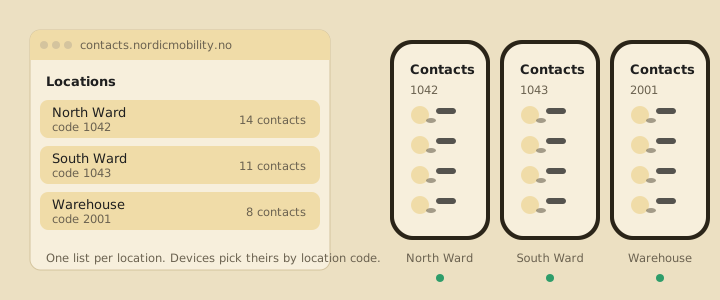
NM Contacts is a small app that SOTI MobiControl installs on the devices, and a web portal where your own staff keep the lists. One list per location.
The person responsible for a ward or a store logs in and changes a number. Every device at that location gets it on the next sync. Deleted numbers disappear from the devices too.
- Your staff maintain the lists in a browser. No SOTI console, no files, no tickets to IT.
- Each device gets its own location's list. Set once per device group in SOTI MobiControl.
- Contacts land in the normal Contacts app. Nothing changes for the person using the device.
- Changes arrive as changes. Nothing is wiped and re-imported, and nothing is duplicated.
- Local contacts are backed up. Numbers staff add on the device can be moved to a replacement.
What it takes to get started
SOTI MobiControl installs the app silently with a profile you set up once. Your administrator creates the locations in the portal, imports the existing lists from a CSV file with name and phone number, and assigns users to their locations.
Most customers are running within an afternoon. We help with the SOTI setup.
Shared devices on SOTI MobiControl?
NM Contacts puts one contact list per location on every device, from one portal, with backup of the contacts staff add themselves.
Contact us