Guide
One MDM profile for every location
Setting up an app on hundreds of devices should not mean configuring hundreds of devices. With Android Enterprise managed app configuration, NM Contacts is set up once in your MDM and works for every location.
In short
- NM Contacts is set up once in one MDM profile.
- The location is set per device group, so every group gets its own list.
- New location, one value in the MDM and one entry in the portal.
Configuration without touching devices
Android Enterprise lets an app receive its settings from the MDM instead of asking the user. The MDM fills in those settings when it installs the app, so the device is ready the moment the app starts. Nobody on the floor sees a setup screen.
One profile, every location
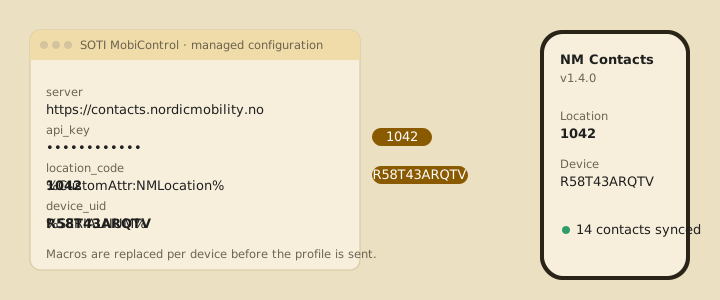
NM Contacts needs three things from the MDM. The server address, your customer key and the location. The first two are the same for all your devices.
The location is set per device group by your MDM administrator, as a device attribute where the MDM supports it or as a value in the group's app configuration. The same app setup is used everywhere, and each group still gets its own contact list.
Move a device to another group, and it gets that group's list on its next sync. Add a new location, and it is one value in the MDM and one location in the portal.
Backup that follows the hardware
The device's serial number is passed in the same way, so the backup of local contacts is tied to the physical device and not to a name that someone may change in the console.
What your MDM administrator does
- Adds the app to a profile and fills in the three settings, once.
- Sets the location attribute on each device group.
- Starts the app once on newly installed devices, or lets the rollout do it.
We send a short setup sheet with the exact values, and we help with the first profile if you want.
An app that is built for managed configuration
NM Contacts is configured entirely through Android Enterprise managed app configuration, with one profile for all locations, in the MDM you already use.
Contact us