Guide
Replacing a broken device without losing the contacts
Enrolling a replacement device in SOTI MobiControl takes minutes. The part that costs time is everything the old device held that was not in a profile, and on a shared device that is mostly contacts.
In short
- SOTI MobiControl restores apps and settings on a replacement device, not the contacts staff added.
- NM Contacts backs up those contacts per device.
- Move them to the new device from the portal, or with a six-digit code on the spot.
What comes back on its own
When the replacement is enrolled into the same device group, SOTI MobiControl gives it the same apps, settings and restrictions as the old device. Nothing has to be typed.
What does not
Everything that lived inside the apps on the old device. On a shared device that is above all the Contacts app.
Over months, staff add numbers directly on the device. The plumber, the taxi company, a colleague's mobile. None of it exists anywhere else. If the device is dropped in a bucket, the list goes with it.
The usual answer is to copy the contacts off the old device while it still works. That takes a visit per device, and it is no help when the device is dead or lost.
How NM Contacts handles it
Every device with NM Contacts backs up the contacts staff have added locally, name and phone number only, to the portal. The backup follows the device's serial number, so it survives renaming and re-enrolment.
Replacing a device then takes one of two paths.
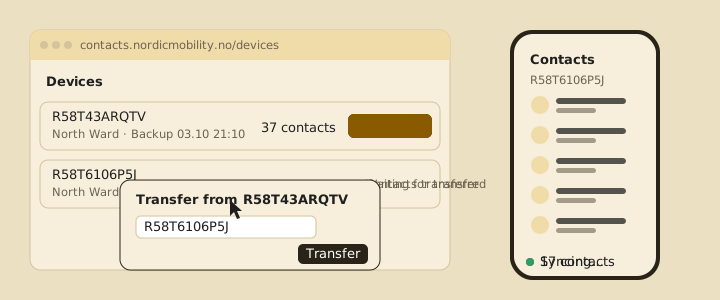
- The old device is dead or lost. Your administrator opens it in the portal, chooses Transfer to, and picks the replacement. The contacts are on the new device after its next sync, without duplicates.
- Both devices are in hand. Tap Send contacts on the old one and enter the six-digit code on the new one. No cables, no Bluetooth, done in a minute.
Backups are deleted six months after a device was last seen, so retired devices leave nothing behind.
What this means for the people on the floor
A replacement device arrives with the location's shared list already on it, and the numbers the previous shift collected come along. Nobody re-types anything, and nobody loses the taxi company's number.
Devices get replaced. Contacts should not get lost.
NM Contacts backs up every device's local contacts and moves them to the replacement from the portal or with a one-time code.
Contact us